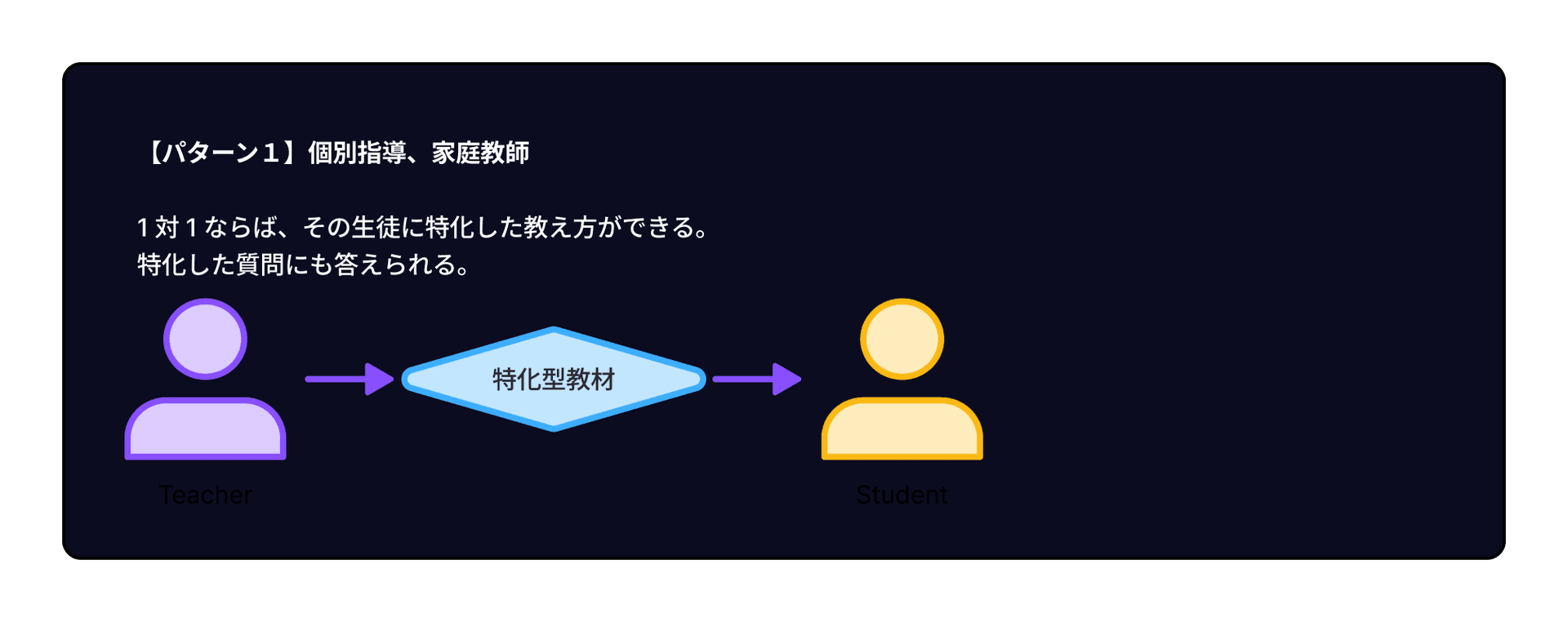
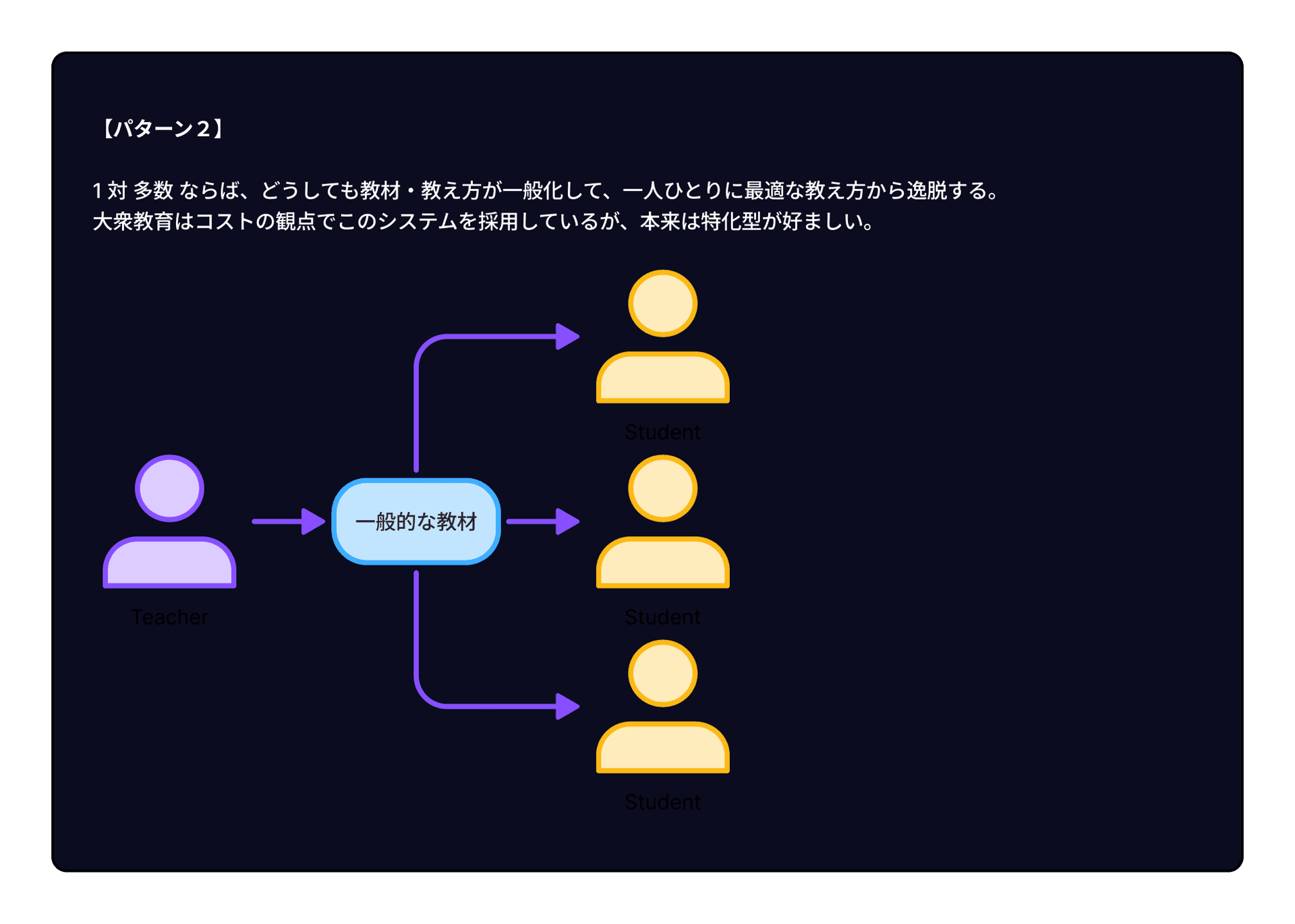
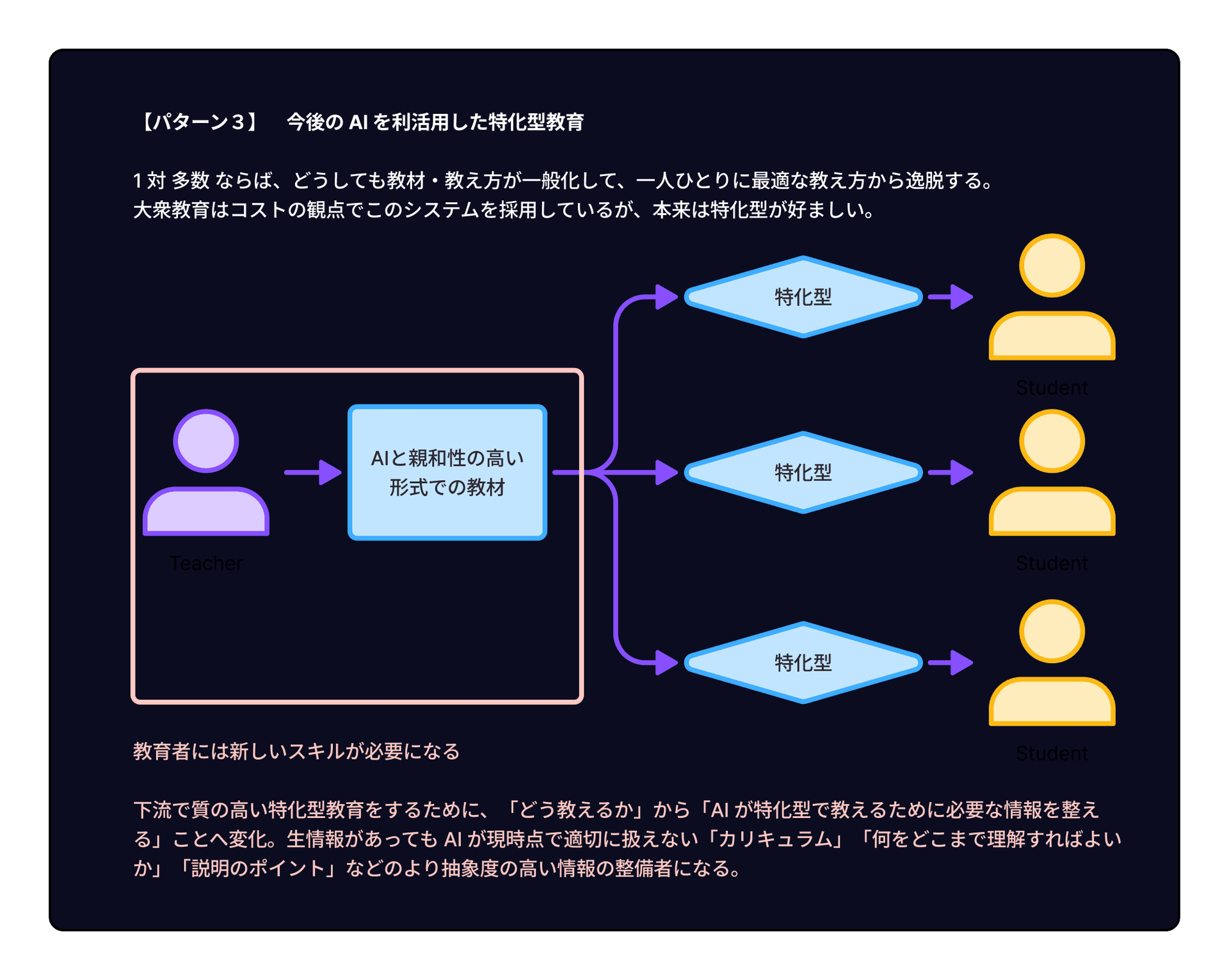
結論としては、各生徒に特化した教え方はAIが担うため、そのAIが有効に機能するための準備を担うのが教育者の役割になるだろうという推測でした。
AI は無限の忍耐力でどんな質問にも答えていくし、過去のやりとりや生徒の特性に基づいて特化した教え方ができる。
そのため、教育において非常に高い貢献をもたらせると考えられている。
Human targeted UIs being replaced or complemented with Agent native interfaces
Apr 15, 2026
ai
We're moving away from separate UIs for each app and towards CLIs / MCPs / APIs that will be interacted with from AI agents.
Some UIs will remain for humans, but for most things where the UI is more of a means then an end, such as smart home devices, we will converge on interaction through an agent.
For example, right now when you setup a smart home, and will need various devices, often from different brands.
A smart door lock from Sesame, automatic curtain closer/openers from SwitchBot, infrared remote controls from Nature-remo, smart plugs from Tapo, voice interface through Alexa and the list goes on...
It is truely a bad experience to configure all of these through different apps. Now we have solutions where we can mostly interact with all of these from a single interface, but there are always comptability issues or the UI just isn't good.
The natural conclusion is, have an AI agent be your interface, you can talk to it, it can make you custom UIs for just your home etc. and have it talk to all the different devices in your home.
Perhaps even look at you calendar and shut off everything in case you're on vacation.
In the coming years, this is the natural direction we will move towards.
Not only for smart-homes but for anything that you use to plan and manage your life.
This is of course focusing on toC products. Now even with toB we often use so many differnt tools for different things, the usecase is very similar.
Now we already have Slack apis, GitHub clis, Notion MCPs and such to do this kind of single interface stuff.
Going forward though, we will see with more and more toC products supporting interfaces more usable by agents such as APIs, MCPs and CLIs.
Perhaps some products will come with no UI at all, who knows.
What are the implications of this?
Will less frontends be created?
When do we use an API vs MCP vs CLI?
Content that gave food for though
Andrej Karpathy podcast epsidode of No Priors.
DHH podcast episode on The pragmatic engineer.
Attitude
Apr 10, 2026
mindset
Victor Frankl wrote
The last of the human freedoms is to choose one’s attitude in any given set of circumstances.
I really resonate with this.
When you try hard or do new things and the world does not give you any good feedback, it is up to you whether to think "well what's the point, let's just quit" or say "I think this was a good try. I learned much. Let's keep going."
You cannot directly control the outcome of your actions, but you can control your attitude and as an extension of that your actions.
If you think what you are doing was out of the right intentions and you learned some things, keep doing it. If there is valid feedback even if painful, incorporate it and connect it to the next endeavor.
It is up to you only, to take on that forward thinking attitude.
Sprint Goals on a pseudo-scrum team
Apr 9, 2026
agile development
We use 1-week sprints and set sprint goals everyday. Sounds like scrum. But in truth we were doing pseudo scrum.
The bottom line of this TIL is that I learned that using terminology that is preresereved in a way that does not follow the original intent, is very confusing and should be avoided.
So we are seemingly doing scrum because we had all of the following
1-week sprints cycles
Sprint planning session at the start of the sprint
A sprint goal for each sprint
A daily standup where we check the sprint goal
But we are also doing the following
The sprint goal is not a single goal of a state we want to be in, but rather multiple-task like goals more like a summary of our sprint-backlog
The sprint goal is set in retrospect, after we planned the whole sprint, making it not a guiding goal, but just a summary?
Therefore, the sprint goal is not a meaningful goal agreed upon by all stakeholders, but rather a reiteration of what we can do based on point-estimation this sprint.
Now this is where we diverge greatly from scrum.
The goal is also not just the goal. The core philosophy of scrum is the fast iterations with meaningful goals which we can calibrate to guide us, so goals are the core part, as well as a sprint is not a sprint without such a sprint goal.
So to my understanding we are not really doing scrum, which is fine, but we use all the scrum terminology which makes it very confusing.
I consulted my teammates but it seems there was no real concern of this confusion and misuse of words.
We agreed that the usage of "sprint" and "sprint goals" was misleading and decided to alter the terminology we use.
My bottom line, we should be clear about the terminology we use for development methodologies, the same way we try to model and build software as clear as possible.
Whether we should be doing a full-scrum / our own unqiue development version / more waterfall-style development, that is another big dwelling question I'll try to touch on again at some point.
Expand-Contract Pattern
Apr 7, 2026
pattern
In software we often need to make changes.
When those changes are non-destructive, such as adding fields to an entity, then we just do it and we're done.
But when the changes are destrucvie, such as changing existing fields or deleting some, then we have a problem.
If everything is internal stuff, meaning the interface surface does not change, we can still just make changes and be done with it.
But if we cross interface surfaces of interfaces between teams, or between deployable units, then we cannot just get it done in one go.
In this case, we can halt everything and make the changes, but that is most of the times no option.
This then means we have to make the changes and migrate while keeping everything operational.
A pattern to achieve this is as following
Add the changes in a non-destructive way, such that we provide both the old and the new at the same time
Migrate the consumers from the old to the new
Delete the old stuff
I have used this pattern multiple times, but just recently did I learn that it has a name.
It seems to be called "Expand and Contract" or "Parallel Change".
The steps can be generalized as
expand
migrate
contract
I didn't have a name for it, and now I have, making it easier to communiciate this with peers.
Great!
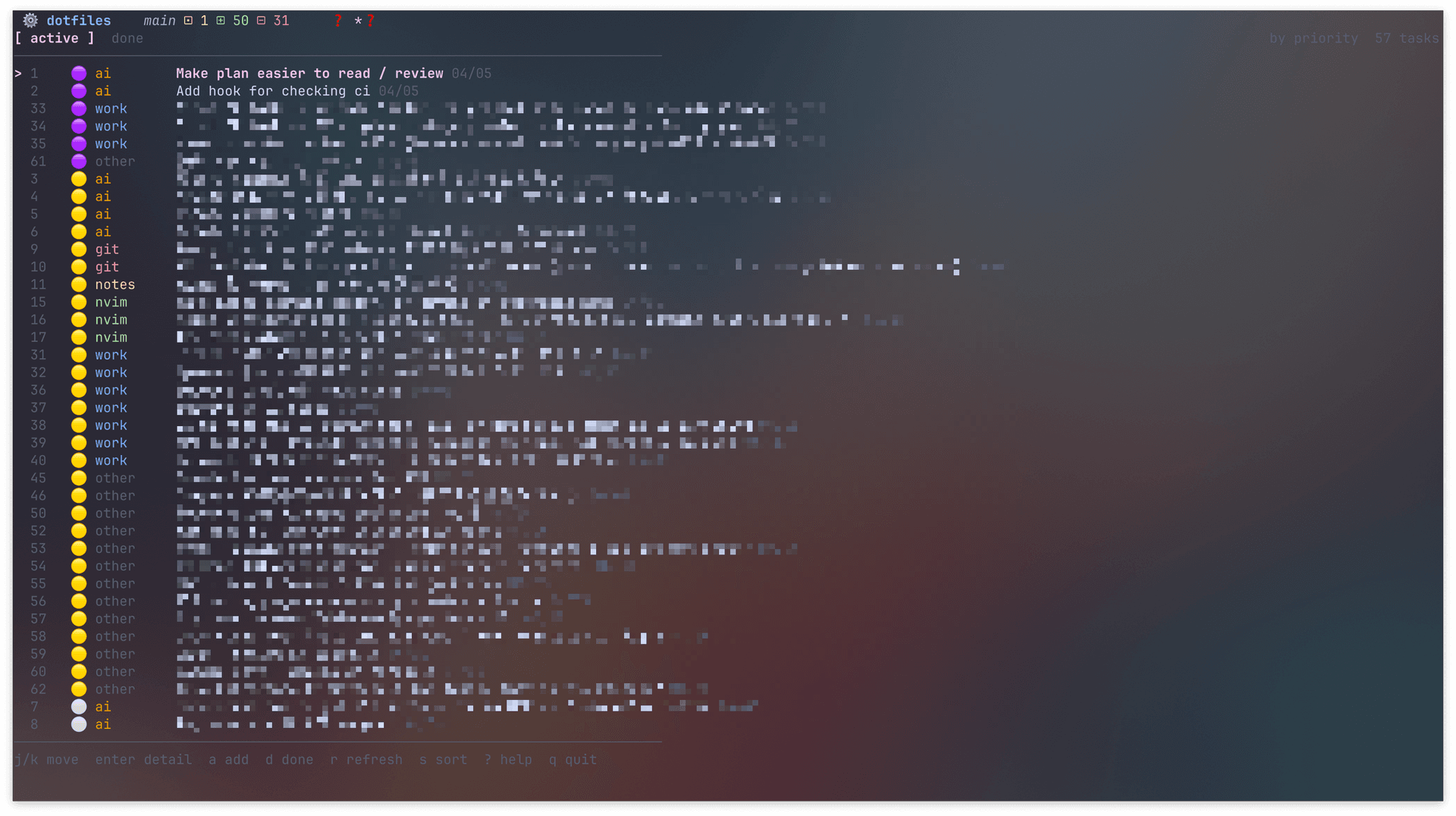
I have managed my todos in a single todo file up to now.
With todos here, I do no mean daily tasks like do this work task etc. but rather an ad hoc improvement to my coding setup / a new tool I want to try out / a new workflow I want to set up etc.
It has worked well so far. Initially it was just a list, then it grew so I needed to add priority info so I could decide on first glance where to chip off of every morning.
I added 3 tier emojis to indiciate low, medium and high priority.
Then it grew more and I decided to create sections per category like nvim, terminal, AI etc.
This then worked for months more or less.
But now there's just so many tasks every day that are newly added that I really need a better system to classify and manage all the tasks.
I tried multiple existing applications but none of them quite worked for me.
The application had to be a terminal-based application for me to work. That's is most important requirement.
And it turns out there aren't too many to-do or task management applications that fulfill this.
The most predominant one seems to be taskwarrior. I tried it out, but it just didn't fit my workflow.
So the natural conclusion in this day and age of vibe coding that allows for almost zero cost custom tooling is to create my own.
I used golang together with lipgloss and bubbletea For the terminal UI.
Each task has a priority, a category, a status of active and done, a title, and a body.
You can have the interactive funnel UI, but you can also edit and delete stuff from the CLI.
The CLI functionality basically allows for bulk updates and deletes through AI agents.
State is persisted in a single JSON file. This JSON file is checked into one of my Git repositories, so everything's safe.
I can filter by priority. I can change the view to show everything clustered by priority or clustered by category.
Adding a functionality just takes me a minute or two, so going forward I'll keep customizing and personalizing this.
My recent conclusion really has been, if you have a common general task, look for general tools and use one that seems good to you. But if you can't find anything, just make your own. These tools are really just for personal use, as well as there is no real risk if they stop working or become hard to maintain. And so this is where AI vibe coding really shines.
Creating custom raycast extensions
Apr 4, 2026
raycast
productivity
At my company, we use notion extensively.
I often found myself clicking through things to open notion pages.
Or, I was looking at my bloated up favorites list to find the link.
I wondered if there is no better way to do this that is quicker and easier.
I looked into the main notion extension, but that did not work for me.
The page search was just too broad, and filter's could not be preset.
90% of the time I look at the same 10 pages. Given this fact I just wanted those to be listed. Plain and simple.
Making a raycast extension is actually really easy, especially if you only intend to use it yourself locally.
It took me about 10min to create and iterate on with Claude Code, to get something personalized for myself.
Basically, the essence of my extension is just the below tsx.
I have a fixed list of pages, with custom aliases to show, and i can fuzzy search them and open them easily.
I registered this, and then assigned the cmd+shift+N hotkey to it. Now I can open my most used pages in about 2s consistenly.
Let's think about what external & internal quality actually mean and what their relationship is.
External quality is the externally observable quality of software.
Does you software look good? Is it easy to use? Does it run fast? Is the security rigid?
Those kinds of things.
Internal quality is the internally observable quality of you software... what does that mean?
This is way more vague than the external one.
There is no checklist we have all agreed on as to what internal quality means.
It requires deep understanding of the product, of the software, of the vision ahead to interpret whether our current situtation is high quality or not.
Is it easy to extend and add new features to? Well that depends on which part we are talking about. Some are some not.
Well, we really care about the parts that we actually intend or are highly likely to extend, but that is only known to a person with a deep understanding of the product vision.
Is it easy to undertstand? (which also partially feeds into easy to extend)
Well, who is the audience? How experienced are they? Are the domain concepts quite common sense things, or are they really domain-specific and need a detailed explanation?
So I think internal quality is quite hard to grasp.
You could just say have tests, write loosely coupled code, have a unified and good way to handle errors etc.
These are true and important.
But, internal quality is not of value by itself. It is only valuable insofar it enables us to uphold and improve the external quality. (which is where the true raison d'etre of our software lies)
Internal quality tends to become a checklist of things that are way too generalized, and way too simplified.
The amount and type of "internal quality" required is very differnt per software product.
To say "internal quality" makes it seem that we have high quality and low quality.
And then we say that automated tests improve internal quality.
Well that means to have "high quality" we must have automated tests.
Well, some products probably won't need too many automated test. Especially when we have other means to test external quality & the product features are frozen.
What "internal quality" means differs from product to product because their goals and situation differs.
So the answer is, we can lay out high-level guiding principles & axis alongst which we should inspect our software to make "high internal quality", but there is no simple checklist with things like many autmoated tests are required for high quality.
So
External quality → the end
Internal quality → the means to sustain the end
And they can each be further split into (but no limiting to)
External quality — does what it should
Correct
Does the right thing
Usable
People can actually use it
Performant / Reliable
Does it consistently and well
Internal quality — easy and safe to change
Easy to understand
Clear naming and structure
Well defined boundaries / separation of concerns
Easy to change
Small, focused, decoupled components
Changes are localized, don't ripple
Safe to change
Tests catch regressions
Changes are reversible / version controlled
Well, if it is safe to change, then it is easy to change so these things are quite overlapping and connected, but this is what the big picture looks likes to me.
Internal quality especially depends on your product and your team, so what "internal quality" means to your product should be discussed per product & team.
Custom RSS Generator
Apr 1, 2026
DIY
I wanted to read the Anthropic Engineering Blog through RSS. It does not support it. This is how I did it.
I use NetNewsWire to get all my daily news to consume.
It is a free & high quality RSS / Atom reader.
Most blog sites provide an rss file, then it's as easy as just adding it in the UI in a matter of seconds.
For Podcasts, most of them support rss so same thing.
For newsletters, I use the Kill the Newsletter! service to convert the newsletter into an RSS feed.
For YouTube channels I want to get updates for, I use Inoreader to convert them into rss feeds, then add Inoreader as a folder in NetNewsWire.
Most things can be covered this way so that I get all my news in a singular space, which is what I need.
But some blog sites just don't provide rss in which case I had no means to import their content.
To solve this issue, you could use the Inoreader premium feature to create an rss feed from any page, but their auto-detection feature did not seem to be too sophisticated? (Not sure just fiddled shortly with it.)
The solution I cam up with was to just vibe code a custom scraper + rss generator with claude code that does the following
Daily cronjob that regenerates the rss files (With an custom adapter per site)
Serve the rss files on localhost:8888
Both are done with launchd since I am using a macbook. So launchd makes sure the rss files are served at all times, such as after reboots.
In the past, creating a custom adapter for each site would have been too much work so this would not have been viable.
But now it's a matter of minutes, and once you've created it, you can keep getting information forever! (probaly not forever...)
This also means that as long as you create this adapter, you're not limited to only blog sites, but you can import any kind of content you can imagine that has periodic update.
So, I finally could get updates for the Anthropic Engineering Blog through RSS! Hurray!
At the end I noticed that the blog appearently now provides a developer newsletter monthly...
Well that might have worked too through Kill the Newsletter!, but it is only monthly so some delay I presume and I am not sure if it is the same content so I am still happy with my solution.
Especially that I now have almost no constraints to what I can read with RSS!
作り方を作る
Mar 28, 2026
meta-skill
「作り方を作る」はいい言葉。これはどういうことなのかを自分なりに言語化する。
まず、作る対象物がある。これは SaaS の Web アプリなどに相当する。
それを(直接)作る行為は例えば以下に該当する。
AI 駆動開発における各種課題点を放置せず、仕組み化で回収し、速度と制度を向上させる。例えば、CI が失敗して人間がいつもその棟をエージェントに伝える伝言者のような役割を担っていたならば、エージェントの終了条件で CI に近しい条件を盛り込み、自己完結型までもっていくこと。また、AI エージェントによる不正確な修正や決定したパターンに準拠しない実装が発生した場合は、その場でだけ修正するのをやめて、全体の設定ファイルの更新やリンタールールの追加などの恒久作に皆が簡単に寄与できるようなしくみを作るなど。
特に AI による自動化がなせる領域が拡大している中、具体的な開発よりもこのようなプロセス化・仕組み化・大局的な作り方について考えて効率化していくことが重要であることは自明だ。
とはいえ、第一線で戦う経験が薄いと、作り方で解決しようとする痛み事態を知らないことになり、正しい課題感を持てなかったり、解決策の方に潜んでいる隠れコストを把握できなかったりすることもあるでしょう。
そのため、一定「作ること」をすることによって「作り方を作る」こともできるようになるんだろうな。その塩梅が難しいが、それは何事についても言える。
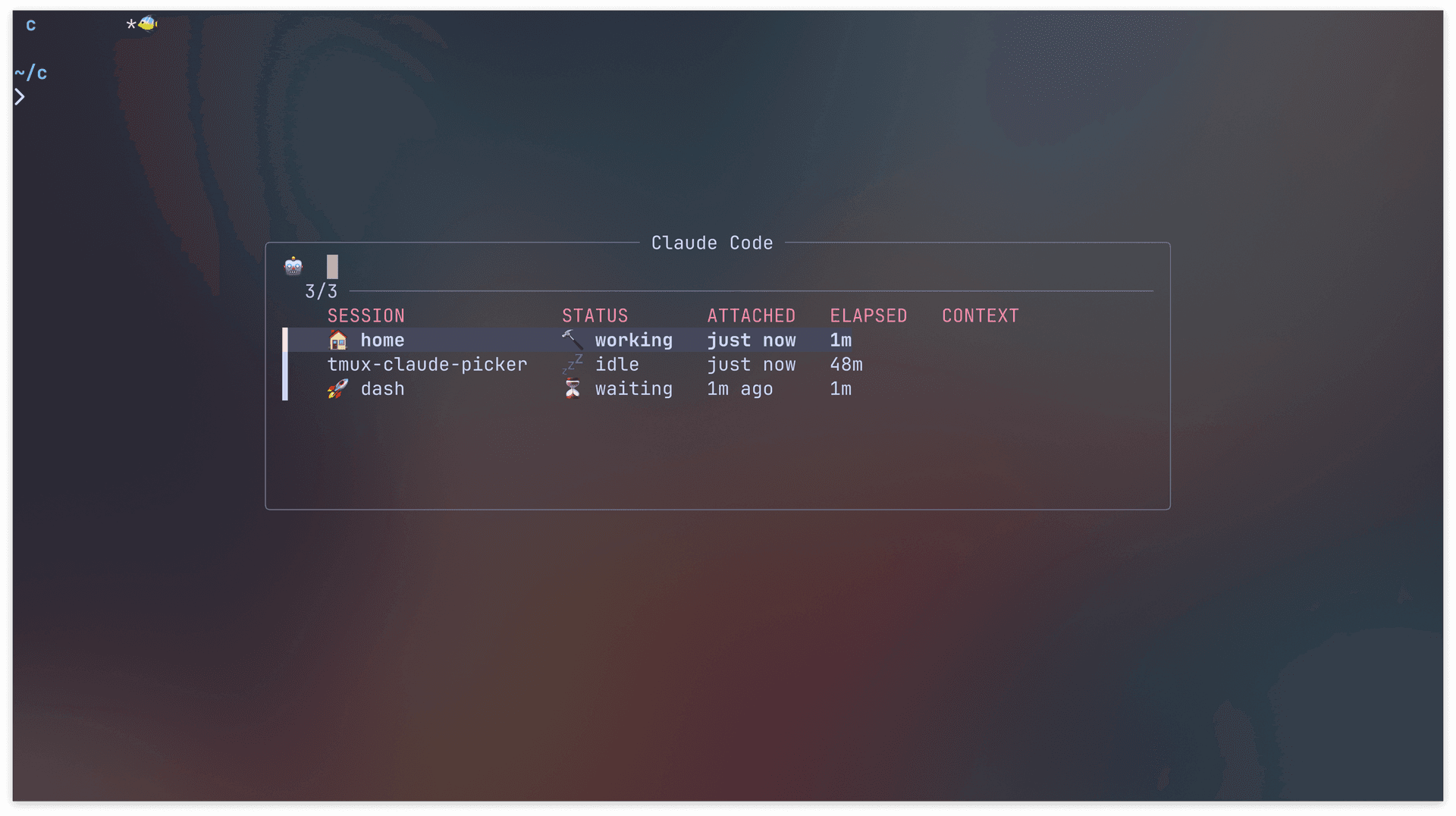
Today, I created a tmux plugin to list all claude sessions, and jump to their respective tmux windows.
I use tmux extensively with many sessions and windows existing at the same time.
Also, I use claude code a lot resulting in many claude code session dispersed across many tmux sessions / windows.
As a result, I often had a hard time tracking which claude code session is still running, what is done and what requires additional input.
Futhermore, I have it setup such that I get notified with a sound when claude code has completed or requires permissions.
But when I run multiple claude code sessions, I had a hard time figuring out where to go, which caused some friction in my development process.
My tailored solution was to create a plugin that utilizes tmux-fzf, a tmux plugin that can have a floating pane where you can fuzzy find, and list all running claude code sessions & their respective states (completed, waiting, running) shown.
Also, it allows me to attach to that specific tmux window that runs it.
Not with one stroke I open this pane, can confirm the total state, and then jump directly to wherever I need to be.
Shared it with some coworkers and they seem to enjoy it too!
We become what we think about
Mar 24, 2026
mindset
Recently I think about this phrase from Earl Nightingale a lot. "We become what we think about".
This implies that our thoughts shape what we become.
If you think about failure every day, you're likely to fail.
If you think about becoming a great engineer every day, you move in that direction.
If you do NOT think about that every day, it won't gonna happen miraculously.
It makes sense to me.
If you think about something everyday, you will have many opportunities to think about it, and that gives you many chances to take smaller steps directed towards it.
In contrast when something is out of your mind, you'll most likely forget about it and when you remember it, months and years will have past.
If just that thing was in your center of focus, you'd have lived such as different life.
It shows how important it is to control and direct your thoughts, especially the core parts.
Any great goal, is not achieved in a day. It is the accumulation of what you do on a daily. So governing the daily you, is what enables you to steer yourself conciously.
One way you can do that is to do with journaling and reflection on the daily.
More is not always better, if you have 10 things you want to be, that dillutes and often nothing remains.
For me, pick only one thing and focus on that. And only once that is fully incoroporated into your focus, should you move on to incoroporate other things.
We become what we think about, so think about what you want to become.
When doing any kind of feature implementation, look at `~/feature_documents/` to see if there are any relevant feature documents.If available, read that document and follow its instructions.Also, if new decisions have been made about the feature or how to implement it that are specific to that feature, then update the document.File format is `<date>-<content>` e.g. `2026-03-18-add-fuzzy-search`
本来はプロジェクト特化の情報のため、プロジェクト付近におくのが好ましいが、まずは試験的に導入ということでこのようにした。
個人の Claude 権限 ~/.claude/settings.json においてこのロケーションの読み書き権限を追記し、権限許可を聞かれないようにもした。